2009年2月17日
John Borthwick 在 Google Next Victim Of Creative Destruction? 一文中阐述了AOL 的死亡以及产业的不断循环, yahoo, ebay 等已经成为技术革新的受害者.
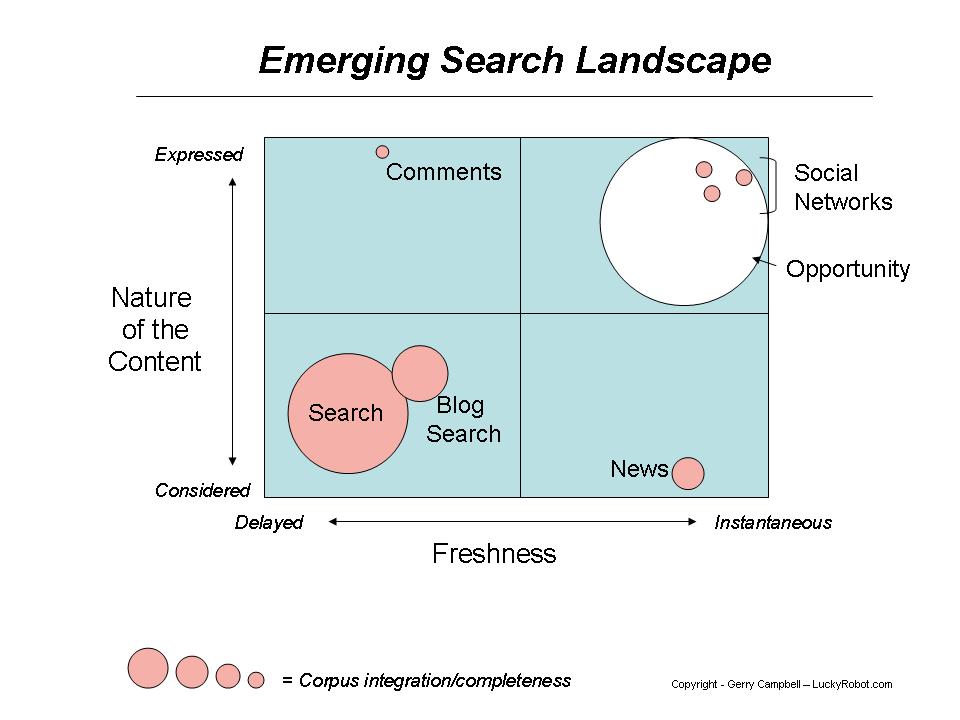
随着搜索的垂直分割, 搜索市场也被细化
1. 视频搜索的突起, youtube 从2007.10 到 2008.10 的搜索增长了114%, 占了google 搜索的26%.
2. 实时消息的发展, 以twitter 为代表, 市场对突发事件的要求的强烈, 使得twitter 迅速发展, twitter 的搜索(http://search.twitter.com/)与传统引擎依赖内容相关以及链接关系相比, 更注重时间的相关性.
Gerry campbell 的文章 Search is broken – really broken. 的一个图说明了这种趋势
2008年12月19日
Python 的logging 模块的Socket 和 Logging4cplus 的 socket 的格式是不一样的, 现实中需要将日志发送到logging4cplus 的服务器, 不得已, 写了个 Python logging 模块到 logging4cplus的Adapter
1 #!/usr/bin/env python
2 #-*- coding: gbk -*-
3 from struct import pack, unpack
4
5 class BufferPack(object):
6 def __init__(self):
7 self.buffer = ''
8
9 def addChar(self, s, unsigned=False):
10 self.buffer += pack(unsigned and '>b' or '>c', s )
11
12 def addShort(self, s, unsigned=False):
13 self.buffer += pack(unsigned and '>H' or '>h', s )
14
15 def addInt(self, s, unsigned=False):
16 self.buffer += pack(unsigned and '>I' or '>i', s )
17
18 def addLong(self, s, unsigned=False):
19 self.buffer += pack(unsigned and '>L' or '>l', s )
20
21 def addString(self, s):
22 self.addInt( len(s) )
23 self.buffer += s
24
25 def addBuffer(self, s):
26 self.buffer += s.buffer
27
28 class BufferUnpack(object):
29
30 char_bits = len( pack('>b', 0) )
31 short_bits = len( pack('>H', 0) )
32 int_bits = len( pack('>I', 0) )
33 long_bits = len( pack('>L', 0) )
34
35 def __init__(self, buffer):
36 self.buffer = buffer
37 self.pos = 0
38
39 def _read_item(self, unpackstr, len):
40 v = unpack(unpackstr, self.buffer[self.pos:self.pos+len] )
41 self.pos += len
42 return v
43
44 def readChar(self, unsigned=False):
45 return self._read_item(unsigned and '<b' or '<c', self.char_bits)
46
47 def readShort(self, unsigned=False):
48 return self._read_item(unsigned and '<H' or '<h', self.short_bits )
49
50 def readInt(self, unsigned=False):
51 return self._read_item(unsigned and '<I' or '<i', self.int_bits )
52
53 def readLong(self, unsigned=False):
54 return self._read_item(unsigned and '<L' or '<l', self.long_bits )
55
56 def readString(self):
57 len = self.readInt()
58 v = self.buffer[self.pos:self.pos+len]
59 self.pos += len
60 return v
61
62 def PackMessage( record ):
63 bp = BufferPack()
64 bp.addChar(2, True)
65 bp.addChar(1, True)
66
67 bp.addString("{log.servername}")
68 bp.addString(record.name)
69 bp.addInt(record.levelno*1000)
70 bp.addString("")
71 bp.addString(record.msg)
72 bp.addString(str(record.threadName))
73 bp.addString(str(record.process))
74 bp.addInt( record.created )
75 bp.addInt( record.msecs )
76 bp.addString(record.filename)
77 bp.addInt( 1 )
78
79 pkg = BufferPack()
80 pkg.addInt(len(bp.buffer), True)
81 pkg.addBuffer( bp )
82
83 return pkg.buffer
84
85 if __name__=="__main__":
86 import logging, logging.handlers
87
88 logger = logging.getLogger()
89 logging.handlers.SocketHandler.makePickle = lambda self,rc : PackMessage(rc)
90
91 hdlr = logging.handlers.SocketHandler('{logserver.ip}', 8888)
92 formatter = logging.Formatter('%(asctime)s %(levelname)s %(message)s')
93 hdlr.setFormatter(formatter)
94 logger.addHandler(hdlr)
95 logger.setLevel(logging.NOTSET)
96
97 logger.info("hello")
使用的时候.
1. 在logging 创建SocketHandler 的时候, 需要修改logging.handlers.SocketHandler.makePickle 为方法 PackMessage
logging.handlers.SocketHandler.makePickle = lambda self,rc : PackMessage(rc)
2. 需要修改代码中的两部分内容 {log.servername} 和 {logserver.ip}
2008年12月4日
BHO就是Browser Helper Object(浏览器辅助对象)
BHO关联原理 (BHO关联的是SHDOCVW,也就是说不只关联IE,下面全部用IE来说明)
1.IE的窗口打开时,先寻找HKLM下的SOFTWARE\Microsoft\Windows\CurrentVersion\Explorer\Browser Helper Objects\ 里的CLSID,这些CLSID,都对应着相应的BHO插件,然后根据这个CLSID到HKCR下的CLSIDs里找到此插件的信息,包括文件位置等。
2.IE根据找到的CLSID信息创建 BHO 对象,并且查找 IObjectWithSite 接口. (这个接口非常简单,只有SetSite和GetSite两个方法)
3.IE把IWebBrowser2(浏览器插件)传到 BHO 的 SetSite 方法,用户在此方法中可挂载自己的事件处理方法。
4.窗口关闭时,IE把 null 传到 BHO 的 SetSite 方法,此方法用来去掉挂载的事件处理方法。
编写BHO流程
1.创建IObjectWithSite显式接口,创建 COM 类型,实现继承IObjectWithSite接口
2.实现此接口并在SetSite方法里加上所要挂载的事件
3.处理事件
4.注册此BHO到注册表中HKLM下的Software\\Microsoft\\Windows\\CurrentVersion\\Explorer\\Browser Helper Objects;(HKCR下的CLSIDs是根据上面的路径自动注册的)
5、.net 下须设置此BHO项目的 配置属性_>生成 中为Interop注册为True,这样才能将.net 类库文件注册到COM
删除BHO
打开注册表项到:HKLM下的Software\\Microsoft\\Windows\\CurrentVersion\\Explorer\\Browser Helper Objects 可以看到下面有一些CLSID值,这些值对应相关的插件,点击可以在默认值后看到相关插件的名称!可以复制相关CLSID到注册表中搜索相关CLSID,找到后打开InprocServer32可以看到相关文件的路径,至于DLL文件等可以用UEDIT32.exe工具打开查看具体信息,当然也可以用修改程序类的eXeScope.exe研究一下!
请根据具体情况删除相关键值和相关文件!
REF:
BHO 的编写
VCKBase 关于IE 编程文档中心
C++中使用BHO来屏蔽特定网站
浏览器集成教学 自定义浏览器
2008年10月29日
zz http://littletutorials.com/2008/07/07/success-as-technical-lead/
分为3个部分
Set yourself up for success
Build your relationship with the team
Build your relationship with the management and business people
Set yourself up for success
1. Define early on what success means for you, the team and the business
You have to have a clear idea of what you want. You also have to understand what team members and the management want. You also have to be aware that what people really want, what they say the want and sometimes even what they think they want are very different things. Try to be very honest at least with yourself. Success has different definitions for different people. If there is a big disconnect between these definitions you have a problem before you start.
2. Believe in the project: idea, architecture, time, team
You cannot have any kind of success if you are convinced you lead a team of morons to implement a stupid idea using the wrong architecture in a ridiculously short time. You have to really believe in the project to have a chance to success. This does not mean lie to yourself. It means do whatever you can to understand your concerns and work on them with the management. As for the architecture, it is best if you have a heavy word or if you are the architect.
3. Understand the domain, the business requirements and the technical challenges
You should be an expert in the technologies used for implementation. You also have to become very knowledgeable in the problem domain and the business case. This will help you understand the business decisions dropped on your head from upstairs and also will help you stand a chance at negotiating them.
4. Know your team: strengths, weaknesses, ambitions and personalities
Software is created by people. Your job as a “tech lead” is to support them in doing that, both from a technical point of view and at a human level. You want to lead a team of motivated and enthusiastic people. But each person gets motivated by different things.
5. Have a plan as a result of a planning activity
“Plans are useless but planning is essential” - (Dwight D Eisenhower, US President, general 1890-1969). Planning will make you think about the problems you face in detail. Also keep in mind that “a plan is just a list of things that ain’t gonna happen” - (Benicio Del Torro in “The Way of the Gun”).
6. Be part in the design of everything
This does not mean do the whole design. You want to empower team members. But your job is to understand and influence each significant subsystem in order to maintain architectural integrity.
7. Get your hands dirty and code
Yes you should take parts of the code and implement them. Even the least glamorous parts. This will help you not getting stuck alone between management and the team. It will also help you gain respect in the team.
8. Act as a communication proxy for your team
In long complex projects with big teams communication is one of the most complicated aspects. The more people you have involved in solving a problem the bigger the communication matrix becomes. Since people need information to be able to make the right decisions this will lead to an exponential increase in the time consumed for communication. Agile methodologies alleviate this problem. But in the end it is up to you to propagate important information to the right people.
9. Make sure everybody understands the big picture: their work has implications
This will help you greatly because will allow team members to design and implement in a way that you don’t have to fight. It is also hard work from your part.
10. Fight for architecture and design consistency
Doing the right thing from the design and architecture point of view is not more costly. It is actually cheaper in every project longer than a couple of months. Every early investment in architecture pays for itself later during integration and maintenance. Even if you have to admit an occasional hack or prototype in the code base you should contain it in very specific modules.
11. Know the status of everybody’s work and detect slippage
This allows for corrective actions and for early communication with the management. You don’t want to be caught by surprise. Remember that during 90% of the allocated time for a task the code is 90% complete.
12. Record technical debt if you need shortcuts but try to maintain architectural integrity; report the debt
This one is very important for products that will have multiple releases. Technical debt should be analyzed at the beginning of each iteration.
13. Use the process that makes sense in your particular case
Tough one. Sometimes (most of the times?) the process is not up to you. In the enterprise usually the process is pre-decided. But always keep in mind that the process in itself means nothing. It is the people who give meaning to the process. Good people can make the worst process work while the wrong team cannot make any process work. Waterfall can be implemented in a very agile way and the agile methodologies can be applied with “rigor mortis” agility (see The Agile 800 Pounds Gorilla).
14. Avoid dogmas - question why everything is done the way is done; make sure everybody else knows the reasons
Sometimes I hear from programmers: we are agile and combine XP and Scrum and we also do TDD (Test Driven Development - I still hope for a TDD that means Thought Driven Development). The questions that pop up in my mind are: Do you need all those? Do you “really” do them by the book?
Anyway the point here is don’t do anything just because it is the way it has always been done. Understand why. Then explain the reasons to all team members. Rinse and repeat.
15. Avoid design by committee; listen to everybody but make your own decisions
No good design is born from referendum. There are lots of people making wild exotic suggestions when their a$$ is not on the line. There are also excessively prudent ideas born from fear. Even with good ideas you have to filter them and make them yours before you can include them in the design. A good architecture and a good design is usually born in one mind, an open mind that looks around. The obvious example is Linux.
Build your relationship with the team 16. Gain the team’s respect with the quality of your work and by doing what you are preaching17. Be fair
18. Admit your mistakes
19. Publicly recognize both team’s and individual members’ merits
20. Don’t blame anybody publicly for anything
21. Build morale and confidence by offering early victories to the team and to its individual members
22. Match people and tasks based on skills and their personal preference if possible; explain your decisions
23. Work the estimates with the team don’t come up with them
24. Mentor people
25. Listen to and learn from people
26. Explain your technical decisions
Build your relationship with the management and business people
27. Be sure you have authority along with responsibility
28. Be sure you get requirements and not architecture/design masked as requirements
29. Explain technical decisions in business terms
30. Try to be accurate in your estimates; avoid being too optimistic and don’t push it with hidden padding; explain the need for padding
31. Set reasonable expectations
32. Understand the relationships and dependencies with other teams or projects
33. Accurately report the status with alarms, explanations and solutions; report any technical debt
34. Resist pressure for change in requirements, and more important for shortcuts…
35. Be aware of politics
36. React to surprises with calm and with documented answers
zz http://www.whenpenguinsattack.com/2006/07/19/php-template-engine-roundup/
该文总结了 php 的一些模板. 我使用过的有smarty, template lib, 还有后来用的 Savant. 感觉smarty 太复杂了, template lib 需要学习一些标签, 并且不是很强大, 综合考虑还是Savant 最好, 既可以使用模板机制, 另外页面模板直接使用php 函数来输出. 功能也还可以.
Smarty
Smarty is a template engine that compiles the templates into PHP scripts, then executes those scripts. Very fast, very flexible.
Savant
A powerful but lightweight PEAR-compliant template system. It is non-compiling, and uses PHP itself as its template language.
Heyes Template Class
A very easy to use, yet powerful and quick template engine that enables you to separate your page layout and design from your code.
FastTemplate
A simple variable interpolation template class that parses your templates for variables and spits out HTML with their values
ShellPage
A simple and easy to use class that lets you make whole websites based on template files for layouts. Change the template and your whole site changes.
STP Simple Template Parser
A simple, light weight and easy to use template parser class. It can assemble a page from several templates, output result pages to the browser or write them to the filesystem.
OO Template Class
An object oriented template class you can use in your own programs.
SimpleTemplate
A template engine to create and structure websites and applications. It can translate and compile the templates.
bTemplate
A small and fast template class that allows you to separate your PHP logic from your HTML presentation code.
ETS - easy template system
A template system that allows you to reshuffle templates with exactly the same data.
EasyTemplatePHP
A simple, yet powerful templating system for your site.
vlibTemplate
A fast, full featured template system that includes a caching and debugging class.
AvanTemplate
A template engine that is multi-byte safe and consumes little computing resource. It supports variable replacement and content blocks that can be set to hidden or shown.
Grafx Software’s Fast Template
A modification of the popular Fast Template system, this includes a cache function, debug console, and silent removal of unassigned dynamic blocks.
TemplatePower
A fast, simple and powerful template class. Features nested dynamic block support, block/file include support and show/hide unassigned variables.
TagTemplate
This library function was designed for use with template files and allows you to retrieve info from HTML files.
htmltmpl: templating engine
A templating engine for Python and PHP. Targeted to web application developers, who want to separate program code and design of their projects.
PHP Class for Parsing Dreamweaver templates
A simple class to parse a Dreamweaver template for use in custom mods for a Gallery 2 and a WordPress blog.
MiniTemplator (Template Engine)
A compact template engine for HTML files. It features a simple syntax for template variables and blocks. Blocks can be nested.
Layout Solution
Simplifies website development and maintenance. It holds commonly used variables and page elements so you don’t need to duplicate common layouts over and over.
Cached Fast Template
This inclusion into FastTemplate allows for caching of the template files, and can even cache with different specifications on separate blocks of content.
TinyButStrong
A template engine that supports MySQL, Odbc, Sql-Server and ADODB. It includes seven methods and two properties.
Brian Lozier’s php based template engine
Only 2k in size, very fast and object-orientated.
WACT
a template engine that separates code from design.
PHPTAL
a XML/XHTML template library for PHP.
ref:
http://www.sitepoint.com/forums/showthread.php?t=123769 对其他的php 模板进行了讨论
2008年10月6日
看条款38 的时候不是很理解, 于是写了个测试代码
#include<iostream>
using namespace std;
class A{
public:
virtual void show(int a=145)
{
cout<<"A: a="<<a<<endl;
}
};
class B: public A
{
public:
void show(int b)
{
cout<<"B: b="<<b<<endl;
}
};
class C: public B
{
public:
void show(int c=999)
{
cout<<"C: c="<<c<<endl;
}
};
class D: public C
{
public:
void show()
{
cout<<"D:\n";
}
};
void main()
{
A *pp;
A a;
B b;
C c;
D d;
a.show();
pp = &a; pp->show();
// b.show(); // error C2660: 'B::show' : function does not take 0 arguments
pp = &b; pp->show();
c.show();
pp = &c; pp->show();
d.show();
pp = &d; pp->show();
C *pc= &d;
pc->show();
system("pause");
}
输出结果是
A: a=145
A: a=145
B: b=145
C: c=999
C: c=145
D:
C: c=145
C: c=999
回顾条款
虚函数是动态绑定而缺省参数值是静态绑定的. 为什么C++坚持这种有违常规的做法呢?答案和运行效率有关。如果缺省参数值被动态绑定,编译器就必须想办法为虚函数在运行时确定合适的缺省值,这将比现在采用的在编译阶段确定缺省值的机制更慢更复杂。做出这种选择是想求得速度上的提高和实现上的简便,所以大家现在才能感受得到程序运行的高效;
所以
a. 静态绑定 .vs. 动态绑定
A *pp
= new B;
这里 pp 静态绑定是 A* , 而动态绑定却是 B*
B *pb = new B;
这里 pb 静态绑定和动态绑定是一样的都是 B*
b. 缺省值是静态绑定的, 而非动态绑定
所以
d.show() 输出 D: 因为show 被 D override
pp
= &d; pp->show();
pp 被动态绑定到D *, 但是show 的缺省值却是A* 的 145, 所以输出的是 C: c=145, 而不是999 ( 函数 show 被C 给override 了)
而 C *pc = &d; pc->show() , pc 静态绑定为C*, 而动态绑定为 D* , 所以输出的是 C: c=999 , 999 是 C* 静态绑定的缺省值
c. 所以调用b.show 的时候出现了如下的错误
// b.show(); // error C2660: 'B::show' : function does not take 0 arguments
因为 B* 没有静态绑定的函数
结论就是
决不要重新定义继承而来的缺省参数值
ref:
从这里学了不少:)
http://bbs.chinaunix.net/viewthread.php?tid=439188
2008年10月3日
为了给黑莓导入iPhone 的通信录(contacts) , 只能利用黑莓的桌面管理器, 通过ipd 来维护.
但是发现 ABC Amber BlackBerry Converter 只能转换而无法修改, IPDManager 只能维护铃声和音乐啥的:( 只能自己写了个小程序
ipd 的格式可以在 http://na.blackberry.com/eng/developers/resources/journals/jan_2006/ipd_file_format.jsp 这里找到, 后面是代码, 只是生成datablock 列表, 还需要额外拷贝. 操作时最好只同步通信录.
下面是代码
#!/usr/local/bin/python2.5
#-*- coding: gbk -*-
from struct import *
class BBFile:
def __init__(self):
pass
def _contactblock(self, name, phone, uid):
s = ''
# name
name = name.encode("utf-16be")
s += pack('<HB', len(name)+1, 0xa0)
s += pack('<B', 0x01) + name
# ff * 8
s += pack('<HB', 8, 0x54)
s += '\xff'*8
# uid
s += pack('<HBI', 4, 0x55, uid)
# phone
phone = phone.encode("gbk")
s += pack('<HB', len(phone)+1, 0x08)
s += phone + '\x00'
return s
def save(self, filename, us, dbID=0, dbVer=0):
hf = open(filename, "w+b")
rs, uid = 1, 363797835 # 初始值
for u in us:
s = self._contactblock(u[0], u[1], uid)
h = pack('<HIBHI', dbID, len(s)+7, dbVer, rs, uid)
hf.write(h + s)
uid += 8 #
rs += 1 #
hf.close()
if __name__=='__main__':
bb = BBFile()
us = [ (u'宝宝1', u'13888888888'),(u'宝宝2', u'13888888888'),(u'宝宝3', u'13888888888'), ]
bb.save("bb.ipd", us, 0, 0)
1. 保存成文件就可以直接运行了:)
2. 如果要真的生成可以导入bb 的文件的话, 要使用高级-> 只同步通讯录, 然后将这个文件生成的内容放在导出文件的头的后面, 还是有点麻烦.... 有空做个全自动的 呵呵
因为只是测试, 所以很多硬编码了:)
2008年9月25日
= HTTP 基础
一个完整的 HTTP 请求可以分成4步:
1. 创建TCP socket, 连接到Web 服务器
2. 发送Http 请求头
3. 接受Web 响应数据
4. 关闭socket 连接
整个流程可以通过telnet hostname 80 来模拟
一个完整的请求例子如下
* About to connect() to www.baidu.com port 80 (#0)
* Trying 202.108.22.5... connected
* Connected to www.baidu.com (202.108.22.5) port 80 (#0)
> GET / HTTP/1.1
> User-Agent: curl/7.16.4 (i586-pc-mingw32msvc) libcurl/7.16.4 OpenSSL/0.9.7e zlib/1.2.2
> Host: www.baidu.com
> Accept: */*
>
< HTTP/1.1 200 OK
< Date: Thu, 25 Sep 2008 05:14:30 GMT
< Server: BWS/1.0
< Content-Length: 3342
< Content-Type: text/html
< Cache-Control: private
< Expires: Thu, 25 Sep 2008 05:14:30 GMT
< Set-Cookie: BAIDUID=3A8165EF68FFEE5F605D33ADEF300BA1:FG=1; expires=Thu, 25-Sep-38 05:14:30 GMT; path=/; domain=.baidu.com
< P3P: CP=" OTI DSP COR IVA OUR IND COM "
<
<html><head><meta http-equiv=Content-Type content="text/html;charset=gb2312"><title>......
另外值得说明的是, HTTP 请求是无状态的,表明在处理一个请求时,Web服务器并不记住来自同一客户端的请求。
= Http 请求头
包含4个部分: 请求行、请求头、空行和请求数据
1. 请求行
由三个标记组成:请求方法、请求URI和HTTP版本,它们用空格分隔, 如:GET /index.html HTTP/1.1
HTTP 规范定义了8种请求方法:
GET 检索URI中标识资源的一个简单请求
HEAD 与GET方法相同,服务器只返回状态行和头标,并不返回请求文档
POST 服务器接受被写入客户端输出流中的数据的请求
PUT 服务器保存请求数据作为指定URI新内容的请求
DELETE 服务器删除URI中命名的资源的请求
OPTIONS 关于服务器支持的请求方法信息的请求
TRACE Web服务器反馈Http请求和其头标的请求
CONNECT 已文档化但当前未实现的一个方法,预留做隧道处理
2. 请求头 [ 可无 ]
由关键字及值对组成,每行一对,关键字和值用冒号(:)分隔。如
> User-Agent: curl/7.16.4 (i586-pc-mingw32msvc) libcurl/7.16.4 OpenSSL/0.9.7e zlib/1.2.2
> Host: www.baidu.com
> Accept: */*
具体请求头如后所列
3. 空行
最后一个请求头之后是一个空行,发送回车符和退行,通知服务器以下不再有头标。
4. 请求数据 [ 可无 ]
使用POST传送数据,最常使用的是Content-Type和Content-Length头标
= Web 响应
由四个部分组成: 状态行、响应头、空行、响应数据, 如:
< HTTP/1.1 200 OK
< Date: Thu, 25 Sep 2008 05:14:30 GMT
< Server: BWS/1.0
< Content-Length: 3342
< Content-Type: text/html
< Cache-Control: private
< Expires: Thu, 25 Sep 2008 05:14:30 GMT
< Set-Cookie: BAIDUID=3A8165EF68FFEE5F605D33ADEF300BA1:FG=1; expires=Thu, 25-Sep-38 05:14:30 GMT; path=/; domain=.baidu.com
< P3P: CP=" OTI DSP COR IVA OUR IND COM "
<
<html><head><meta http-equiv=Content-Type content="text/html;charset=gb2312"><title>......
1.状态行
由三个标记组成:HTTP版本、响应代码和响应描述
HTTP版本:: 向客户端指明其可理解的最高版本。
响应代码:: 3位的数字代码,指出请求的成功或失败,如果失败则指出原因。
响应描述:: 为响应代码的可读性解释。
如
< HTTP/1.1 200 OK
HTTP响应码划分如下(祥见后):
1xx:信息,请求收到,继续处理
2xx:成功,行为被成功地接受、理解和采纳
3xx:重定向,为了完成请求,必须进一步执行的动作
4xx:客户端错误
2.响应头
跟请求头一样,它们指出服务器的功能,标识出响应数据的细节。
3.空行
最后一个响应头标之后是一个空行,发送回车符和退行,表明服务器以下不再有头标。
4.响应数据
HTML文档和图像等,就是HTML本身。
= HTTP头
用以描述客户端或者服务器的属性、被传输的资源等, 分为
1.通用头标:即可用于请求,也可用于响应,是作为一个整体而不是特定资源与事务相关联。
2.请求头标:允许客户端传递关于自身的信息和希望的响应形式。
3.响应头标:服务器和于传递自身信息的响应。
4.实体头标:定义被传送资源的信息。即可用于请求,也可用于响应。
下表描述在HTTP/1.1中用到的头标
Accept 定义客户端可以处理的媒体类型,按优先级排序;
在一个以逗号为分隔的列表中,可以定义多种类型和使用通配符。例如:Accept: image/jpeg,image/png,*/*
Accept-Charset 定义客户端可以处理的字符集,按优先级排序;
在一个以逗号为分隔的列表中,可以定义多种类型和使用通配符。例如:Accept-Charset: iso-8859-1,*,utf-8
Accept-Encoding 定义客户端可以理解的编码机制。例如:Accept-Encoding:gzip,compress
Accept-Language 定义客户端乐于接受的自然语言列表。例如:Accept-Language: en,de
Accept-Ranges 一个响应头标,它允许服务器指明:将在给定的偏移和长度处,为资源组成部分的接受请求。
该头标的值被理解为请求范围的度量单位。例如Accept-Ranges: bytes或Accept-Ranges: none
Age 允许服务器规定自服务器生成该响应以来所经过的时间长度,以秒为单位。
该头标主要用于缓存响应。例如:Age: 30
Allow 一个响应头标,它定义一个由位于请求URI中的次源所支持的HTTP方法列表。例如:Allow: GET,PUT
AUTHORIZATION 一个响应头标,用于定义访问一种资源所必需的授权(域和被编码的用户ID与口令)。
例如:Authorization: Basic YXV0aG9yOnBoaWw=
Cache-Control 一个用于定义缓存指令的通用头标。例如:Cache-Control: max-age=30
Connection 一个用于表明是否保存socket连接为开放的通用头标。例如:Connection: close或Connection: keep-alive
Content-Base 一种定义基本URI的实体头标,为了在实体范围内解析相对URLs。
如果没有定义Content-Base头标解析相对URLs,使用Content-Location URI(存在且绝对)或使用URI请求。
例如:Content-Base: Http://www.myweb.com
Content-Encoding 一种介质类型修饰符,标明一个实体是如何编码的。例如:Content-Encoding: zip
Content-Language 用于指定在输入流中数据的自然语言类型。例如:Content-Language: en
Content-Length 指定包含于请求或响应中数据的字节长度。例如:Content-Length:382
Content-Location 指定包含于请求或响应中的资源定位(URI)。
如果是一绝。对URL它也作为被解析实体的相对URL的出发点。
例如:Content-Location: http://www.myweb.com/news
Content-MD5 实体的一种MD5摘要,用作校验和。
发送方和接受方都计算MD5摘要,接受方将其计算的值与此头标中传递的值进行比较。
例如:Content-MD5: <base64 of 128 MD5 digest>
Content-Range 随部分实体一同发送;标明被插入字节的低位与高位字节偏移,也标明此实体的总长度。
例如:Content-Range: 1001-2000/5000
Contern-Type 标明发送或者接收的实体的MIME类型。例如:Content-Type: text/html
Date 发送HTTP消息的日期。例如:Date: Mon,10PR 18:42:51 GMT
ETag 一种实体头标,它向被发送的资源分派一个唯一的标识符。
对于可以使用多种URL请求的资源,ETag可以用于确定实际被发送的资源是否为同一资源。
例如:ETag: "208f-419e-30f8dc99"
Expires 指定实体的有效期。例如:Expires: Mon,05 Dec 2008 12:00:00 GMT
Form 一种请求头标,给定控制用户代理的人工用户的电子邮件地址。例如:From: webmaster@myweb.com
Host 被请求资源的主机名。对于使用HTTP/1.1的请求而言,此域是强制性的。例如:Host: www.myweb.com
If-Modified-Since 如果包含了GET请求,导致该请求条件性地依赖于资源上次修改日期。
如果出现了此头标,并且自指定日期以来,此资源已被修改,应该反回一个304响应代码。
例如:If-Modified-Since: Mon,10PR 18:42:51 GMT
If-Match 如果包含于一个请求,指定一个或者多个实体标记。只发送其ETag与列表中标记区配的资源。
例如:If-Match: "208f-419e-308dc99"
If-None-Match 如果包含一个请求,指定一个或者多个实体标记。资源的ETag不与列表中的任何一个条件匹配,操作才执行。
例如:If-None-Match: "208f-419e-308dc99"
If-Range 指定资源的一个实体标记,客户端已经拥有此资源的一个拷贝。必须与Range头标一同使用。
如果此实体自上次被客户端检索以来,还不曾修改过,那么服务器只发送指定的范围,否则它将发送整个资源。
例如:Range: byte=0-499<CRLF>If-Range:"208f-419e-30f8dc99"
If-Unmodified-Since 只有自指定的日期以来,被请求的实体还不曾被修改过,才会返回此实体。
例如:If-Unmodified-Since:Mon,10PR 18:42:51 GMT
Last-Modified 指定被请求资源上次被修改的日期和时间。例如:Last-Modified: Mon,10PR 18:42:51 GMT
Location 对于一个已经移动的资源,用于重定向请求者至另一个位置。
与状态编码302(暂时移动)或者301(永久性移动)配合使用。
例如:Location: http://www2.myweb.com/index.jsp
Max-Forwards 一个用于TRACE方法的请求头标,以指定代理或网关的最大数目,该请求通过网关才得以路由。
在通过请求传递之前,代理或网关应该减少此数目。例如:Max-Forwards: 3
Pragma 一个通用头标,它发送实现相关的信息。例如:Pragma: no-cache
Proxy-Authenticate 类似于WWW-Authenticate,便是有意请求只来自请求链(代理)的下一个服务器的认证。
例如:Proxy-Authenticate: Basic realm-admin
Proxy-Proxy-Authorization 类似于授权,但并非有意传递任何比在即时服务器链中更进一步的内容。
例如:Proxy-Proxy-Authorization: Basic YXV0aG9yOnBoaWw=
Public 列表显示服务器所支持的方法集。例如:Public: OPTIONS,MGET,MHEAD,GET,HEAD
Range 指定一种度量单位和一个部分被请求资源的偏移范围。例如:Range: bytes=206-5513
Refener 一种请求头标域,标明产生请求的初始资源。对于HTML表单,它包含此表单的Web页面的地址。
例如:Refener: http://www.myweb.com/news/search.html
Retry-After 一种响应头标域,由服务器与状态编码503(无法提供服务)配合发送,以标明再次请求之前应该等待多长时间。
此时间即可以是一种日期,也可以是一种秒单位。例如:Retry-After: 18
Server 一种标明Web服务器软件及其版本号的头标。例如:Server: Apache/2.0.46(Win32)
Transfer-Encoding 一种通用头标,标明对应被接受方反向的消息体实施变换的类型。例如:Transfer-Encoding: chunked
Upgrade 允许服务器指定一种新的协议或者新的协议版本,与响应编码101(切换协议)配合使用。
例如:Upgrade: HTTP/2.0
User-Agent 定义用于产生请求的软件类型(典型的如Web浏览器)。
例如:User-Agent: Mozilla/4.0(compatible; MSIE 5.5; Windows NT; DigExt)
Vary 一个响应头标,用于表示使用服务器驱动的协商从可用的响应表示中选择响应实体。例如:Vary: *
Via 一个包含所有中间主机和协议的通用头标,用于满足请求。例如:Via: 1.0 fred.com, 1.1 wilma.com
Warning 用于提供关于响应状态补充信息的响应头标。例如:Warning: 99 www.myweb.com Piano needs tuning
www-Authenticate 一个提示用户代理提供用户名和口令的响应头标,与状态编码401(未授权)配合使用。响应一个授权头标。
例如:www-Authenticate: Basic realm=zxm.mgmt
= HTTP码应码
响应码由三位十进制数字组成,它们出现在由HTTP服务器发送的响应的第一行, 分五种类型,由它们的第一位数字表示:
- 1xx:信息,请求收到,继续处理
- 2xx:成功,行为被成功地接受、理解和采纳
- 3xx:重定向,为了完成请求,必须进一步执行的动作
- 4xx:客户端错误,请求包含语法错误或者请求无法实现
- 5xx:服务器错误,服务器不能实现一种明显无效的请求
下表显示每个响应码及其含义:
100 继续
101 分组交换协
200 OK
201 被创建
202 被采纳
203 非授权信息
204 无内容
205 重置内容
206 部分内容
300 多选项
301 永久地传送
302 找到
303 参见其他
304 未改动
305 使用代理
307 暂时重定向
400 错误请求
401 未授权
402 要求付费
403 禁止
404 未找到
405 不允许的方法
406 不被采纳
407 要求代理授权
408 请求超时
409 冲突
410 过期的
411 要求的长度
412 前提不成立
413 请求实例太大
414 请求URI太大
415 不支持的媒体类型
416 无法满足的请求范围
417 失败的预期
500 内部服务器错误
501 未被使用
502 网关错误
503 不可用的服务
504 网关超时
505 HTTP版本未被支持
= 实例
== POST 数据
== 上传一个文件
假设接受文件的网页程序位于 http://192.168.29.65/upload_file/UploadFile.假设我们要发送一个二进制文件、一个文本框表单项、一个密码框表单项。文件名为 "1.txt" ,其内容如下:(其中的XXX代表二进制数据,如 01 02 03)
a
bb
ccc
客户端链接 192.168.29.65 后, 应该发送如下http 请求:
POST /upload_file/UploadFile HTTP/1.1
Accept: text/plain, */*
Accept-Language: zh-cn
Host: 192.168.29.65
Content-Type:multipart/form-data;boundary=---------------------------7d33a816d302b6
User-Agent: Mozilla/4.0 (compatible; OpenOffice.org)
Content-Length: 333
Connection: Keep-Alive
-----------------------------7d33a816d302b6
Content-Disposition: form-data; name="userfile1"; filename="E:s"
Content-Type: application/octet-stream
a
bb
ccc
-----------------------------7d33a816d302b6
Content-Disposition: form-data; name="text1"
foo
-----------------------------7d33a816d302b6
Content-Disposition: form-data; name="password1"
bar
-----------------------------7d33a816d302b6--
(上面有一个回车)
此内容必须一字不差,包括最后的回车。
注意:Content-Length: 333 这里的333是红色内容的总长度(包括最后的回车)
注意这一行:
Content-Type: multipart/form-data; boundary=---------------------------7d33a816d302b6
根据 rfc1867, multipart/form-data是必须的.
---------------------------7d33a816d302b6 是分隔符,分隔多个文件、表单项。其中33a816d302b6 是即时生成的一个数字,用以确保整个分隔符不会在文件或表单项的内容中出现。Form每个部分用分隔符分割,分隔符之前必须加上"--"着两个字符(即--{boundary})才能被http协议认为是Form的分隔符,表示结束的话用在正确的分隔符后面添加"--"表示结束。
前面的 ---------------------------7d 是 IE 特有的标志,Mozila 为---------------------------71.
每个分隔的数据的都可以用Content-Type来表示下面数据的类型,可以参考rfc1341 (http://www.ietf.org/rfc/rfc1341.txt) 例如:
Contect-Type:application/octet-stream 表示下面的数据是二进制数据
Contect-Type:text/plain 表示下面的数据是ASSCII码数据
Contect-Type:text/richtext 表示下面的数据是RTF格式
2008年8月14日
想要在c++ 中嵌入script 代码, 除了自己写脚本引擎外, lua, python 都可以在c++ 中使用, 另外 MonoBind, AngelScript library 都是一些c++ script library, 可以嵌入到c++ 中使用 .
今天在c++ 中试着嵌入 python 代码 (示例代码在 Python-2.5.2\Demo\embed\ 下)
#include <Python.h>
int main(int argc, char *argv[])
{
// Py_NoSiteFlag = 1;
// Py_SetPythonHome("D:\\usr\\Python"); // PYTHONHOME
Py_Initialize();
PyRun_SimpleString("from time import time,ctime\n"
"print 'Today is',ctime(time())\n");
Py_Finalize();
return 0;
}
在运行时可能会产生类似 'import site' failed; use -v for traceback 的错误, 原因是python 在import module 的时候的路径问题. 有3种方法可以解决(以前通过设置环境变量 PYTHONPATH 好像在2.5 已经无效了).
0. 取消注释 Py_NoSiteFlag = 1;
这个只是取消import site , 当然如果在代码中要import 啥的话, 还是会出现错误的.
a. 设置环境变量 PYTHONHOME = D:\usr\Python
b. 在调用 Py_Initialize 之前调用函数
Py_SetPythonHome("D:\\usr\\Python"); // 参数是python 的安装目录
2. 其他一些有用的资源
Python/C API Reference Manual (API 参考) , Extending and Embedding the Python Interpreter (扩展及嵌入Python解释器, 主要说明了如何扩展Python, 给Python 写扩展, 其中 5. Embedding Python in Another Application 一章讲述了在C++中嵌入/调用Python 代码 )
使用C/C++扩展Python 对文 Extending and Embedding the Python Interpreter 作了精简, 很不错的一篇文章, 但是跳过了一些基础 .
Building Hybrid Systems with Boost.Python 介绍了使用boost.python 方便python 插件开发, python绑定c++程序 是其中文版本.
Embedding Python in Multi-Threaded C/C++ Applications 讲了c++在多线程环境如何使用Python , 文 C++多线程中调用python api函数 提供了一个多线程的封装.
SCXX - A Simple Python/C++ API
http://davidf.sjsoft.com/mirrors/mcmillan-inc/scxx.html
C++扩展和嵌入Python应用 (介绍了一些Python/C API 函数, 以及ext 例子, 一般般)
http://hi.baidu.com/yunsweet/blog/item/20b08aeebaa2b1282cf534c7.html
3. Python 多线程的使用
zz http://blog.csdn.net/liguangyi/archive/2007/06/20/1659697.aspx
今天看了近一天关于多线程的应用中,如何安全调用python方面的资料,开始的时候看的简直头大如斗,被python语言的全局锁(Global Interpreter Lock)、线程状态(Thread State )等都有点绕晕了,后来经过各方面文章和帮助文档的相互参考,发现对于2.4/2.5版本,提供了PyGILState_Ensure, PyGILState_Release,哎,这下可方便大发了。
一、首先定义一个封装类,主要是保证PyGILState_Ensure, PyGILState_Release配对使用,而且这个类是可以嵌套使用的。
#include <python.h>
class PyThreadStateLock
{
public:
PyThreadStateLock(void)
{
state = PyGILState_Ensure( );
}
~PyThreadStateLock(void)
{
PyGILState_Release( state );
}
private:
PyGILState_STATE state;
};
二、在主线程中,这样处理
// 初始化
Py_Initialize();
// 初始化线程支持
PyEval_InitThreads();
// 启动子线程前执行,为了释放PyEval_InitThreads获得的全局锁,否则子线程可能无法获取到全局锁。
PyEval_ReleaseThread(PyThreadState_Get());
// 其他的处理,如启动子线程等
......
// 保证子线程调用都结束后
PyGILState_Ensure();
Py_Finalize();
// 之后不能再调用任何python的API
三、在主线程,或者子线程中,调用python本身函数的都采用如下处理
{
class PyThreadStateLock PyThreadLock;
// 调用python的API函数处理
......
}
呵呵,看这样是否非常简单了。
另外还有两个和全局锁有关的宏,Py_BEGIN_ALLOW_THREADS 和 Py_END_ALLOW_THREADS。这两个宏是为了在较长时间的C函数调用前,临时释放全局锁,完成后重新获取全局锁,以避免阻塞其他python的线程继续运行。这两个宏可以这样调用
{
class PyThreadStateLock PyThreadLock;
// 调用python的API函数处理
......
Py_BEGIN_ALLOW_THREADS
// 调用需要长时间的C函数
......
Py_END_ALLOW_THREADS
// 调用python的API函数处理
......
}
4. 可能的错误及解决
a. 在vs 200x 下 debug 模式出现链接问题
extmodule.obj : error LNK2019: unresolved external symbol __imp___Py_Dealloc referenced in function _PySwigObject_format
extmodule.obj : error LNK2019: unresolved external symbol __imp___Py_NegativeRefcount referenced in function _PySwigObject_format
extmodule.obj : error LNK2001: unresolved external symbol __imp___Py_RefTotal
extmodule.obj : error LNK2019: unresolved external symbol __imp___PyObject_DebugFree referenced in function _PySwigObject_dealloc
extmodule.obj : error LNK2019: unresolved external symbol __imp___PyObject_DebugMalloc referenced in function _PySwigObject_New
extmodule.obj : error LNK2019: unresolved external symbol __imp__Py_InitModule4TraceRefs referenced in function _init_extmodule
主要是因为 Py_DEBUG/Py_TRACE_REFS 引起, 修改 Python\include 下的 pyconfig.h, object.h 两个文件就行了 ... 详见 http://www.nabble.com/link-error-in-debug-mode-td3126668.html
Python 支持Com调用(client com) 以及撰写COM 组件(server com).
1. com 调用示例(使用Windows Media Player 播放音乐)
from win32com.client import Dispatch
mp = Dispatch("WMPlayer.OCX")
tune = mp.newMedia("C:/WINDOWS/system32/oobe/images/title.wma")
mp.currentPlaylist.appendItem(tune)
mp.controls.play()
2. com server 的编写
主要可以参考 <<
Python Programming on Win32 之 Chapter 12 Advanced Python and COM http://oreilly.com/catalog/pythonwin32/chapter/ch12.html >>
示例(分割字符串)
- 代码
class PythonUtilities:
_public_methods_ = [ 'SplitString' ]
_reg_progid_ = "PythonDemos.Utilities"
# NEVER copy the following ID
# Use "print pythoncom.CreateGuid()" to make a new one.
_reg_clsid_ = "{41E24E95-D45A-11D2-852C-204C4F4F5020}"
def SplitString(self, val, item=None):
import string
if item != None: item = str(item)
return string.split(str(val), item)
# Add code so that when this script is run by
# Python.exe, it self-registers.
if __name__=='__main__':
print "Registering COM server "
"
import win32com.server.register
win32com.server.register.UseCommandLine(PythonUtilities)
- 注册/注销Com
|
Command-Line Option
|
Description
|
|
|
The default is to register the COM objects.
|
|
--unregister
|
Unregisters the objects. This removes all references to the objects from the Windows registry.
|
|
--debug
|
Registers the COM servers in debug mode. We discuss debugging COM servers later in this chapter.
|
|
--quiet
|
Register (or unregister) the object quietly (i.e., don't report success).
|
- 使用COM 可以在python 命令行下运行
>>> import win32com.client
>>> s = win32com.client.Dispatch("PythonDemos.Utilities")
>>> s.SplitString("a,b,c", ",")
((u'a', u'a,b,c'),)
>>>
3. python server com 原理
其实在注册表中查找到python com 的实现内幕
 Windows Registry Editor Version 5.00
[HKEY_CLASSES_ROOT\CLSID\{41E24E95-D45A-11D2-852C-204C4F4F5020}]
@="PythonDemos.Utilities"
[HKEY_CLASSES_ROOT\CLSID\{41E24E95-D45A-11D2-852C-204C4F4F5020}\Debugging]
@="0"
[HKEY_CLASSES_ROOT\CLSID\{41E24E95-D45A-11D2-852C-204C4F4F5020}\Implemented Categories]
[HKEY_CLASSES_ROOT\CLSID\{41E24E95-D45A-11D2-852C-204C4F4F5020}\Implemented Categories\{B3EF80D0-68E2-11D0-A689-00C04FD658FF}]
[HKEY_CLASSES_ROOT\CLSID\{41E24E95-D45A-11D2-852C-204C4F4F5020}\InprocServer32]
@="pythoncom25.dll"
"ThreadingModel"="both"
[HKEY_CLASSES_ROOT\CLSID\{41E24E95-D45A-11D2-852C-204C4F4F5020}\LocalServer32]
@="D:\\usr\\Python\\pythonw.exe \"D:\\usr\\Python\\lib\\site-packages\\win32com\\server\\localserver.py\" {41E24E95-D45A-11D2-852C-204C4F4F5020}"
[HKEY_CLASSES_ROOT\CLSID\{41E24E95-D45A-11D2-852C-204C4F4F5020}\ProgID]
@="PythonDemos.Utilities"
[HKEY_CLASSES_ROOT\CLSID\{41E24E95-D45A-11D2-852C-204C4F4F5020}\PythonCOM]
@="PythonDemos.PythonUtilities"
[HKEY_CLASSES_ROOT\CLSID\{41E24E95-D45A-11D2-852C-204C4F4F5020}\PythonCOMPath]
@="D:\\"
inproc server 是通过pythoncom25.dll 实现
local server 通过localserver.py 实现
com 对应的python 源文件信息在 PythonCOMPath & PythonCOM
4. 使用问题
用PHP 或者 c 调用com 的时候
<?php
$com = new COM("PythonDemos.Utilities");
$rs = $com->SplitString("a b c");
foreach($rs as $r)
echo $r."\n";
?>
会碰到下面的一些错误.
pythoncom error: PythonCOM Server - The 'win32com.server.policy' module could not be loaded.
<type 'exceptions.ImportError'>: No module named server.policy pythoncom error: CPyFactory::CreateInstance failed to create instance. (80004005)
可以通过2种方式解决:
a. 设置环境 PYTHONHOME = D:\usr\Python
另外在c ++ 使用python 的时候, 如果import module 出现错误
'import site' failed; use -v for traceback 的话, 也可以通过设置这个变量解决.
b. 为com 生产exe, dll 可执行文件, setup.py 代码如下 :
from distutils.core import setup
import py2exe
import sys
import shutil
# Remove the build tree ALWAYS do that!
shutil.rmtree("build", ignore_errors=True)
# List of modules to exclude from the executable
excludes = ["pywin", "pywin.debugger", "pywin.debugger.dbgcon", "pywin.dialogs", "pywin.dialogs.list"]
# List of modules to include in the executable
includes = ["win32com.server"]
# ModuleFinder can't handle runtime changes to __path__, but win32com uses them
try:
# if this doesn't work, try import modulefinder
import py2exe.mf as modulefinder
import win32com
for p in win32com.__path__[1:]:
modulefinder.AddPackagePath("win32com", p)
for extra in ["win32com.shell", "win32com.server"]: #,"win32com.mapi"
__import__(extra)
m = sys.modules[extra]
for p in m.__path__[1:]:
modulefinder.AddPackagePath(extra, p)
except ImportError:
# no build path setup, no worries.
pass
# Set up py2exe with all the options
setup(
options = {"py2exe": {"compressed": 2,
"optimize": 2,
#"bundle_files": 1,
"dist_dir": "COMDist",
"excludes": excludes,
"includes": includes}},
# The lib directory contains everything except the executables and the python dll.
# Can include a subdirectory name.
zipfile = None,
com_server = ['PythonDemos'], # 文件名!!
)
ref:
http://oreilly.com/catalog/pythonwin32/chapter/ch12.html http://blog.donews.com/limodou/archive/2005/09/02/537571.aspx