The Elements of a 2D/3D Game
Video games are extremely complex pieces of software.This means that you have to learn a new way of programming that's more conducive to real-time applications and simulation, rather than single-line, event-driven, or sequential logic programs that you might be used to. A video game is basically a continuous loop that performs logic and draws an image on the screen—usually at a rate of 30–60 fps (frames per second) or more. This is similar to how a movie is displayed, except that you are making the movie as you go.
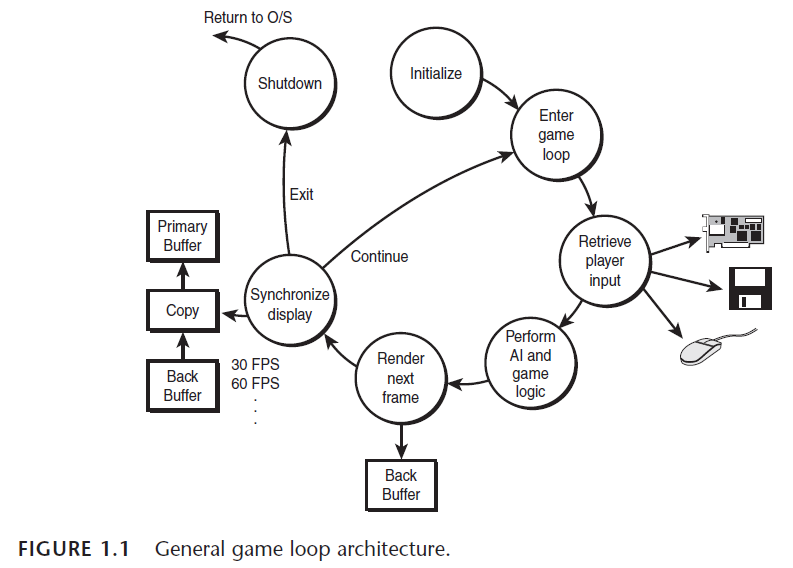
Section 1: Initialization
In this section, you perform the standard operations you would for any program, such as memory allocation, resource acquisition, loading data from the disk, and so forth.
Section 2: Enter Game Loop
In this section, the code execution enters into the main game loop. This is where the action begins and continues until the user exits out of the main loop.
Section 3: Retrieve Player Input
In this section, the player’s input is processed and/or buffered for later use in the AI and logic section.
Section 4: Perform AI and Game Logic
This section contains the majority of the game code. The artificial intelligence, physics systems, and general game logic are executed, and the results are used to draw the next frame on the screen.
Section 5: Render Next Frame
In this section, the results of the player's input and the execution of the game AI and logic are used to generate the next frame of animation for the game. This image is usually drawn on an offscreen buffer area, so you can't see it being rendered. Next the image is very quickly copied to the visible display, creating the illusion of animation. In the case of a 3D softwarebased engine, thousands (or millions in some cases) of polygons are rendered that compose the world by a very complex 3D graphics pipeline. In the case of a 3D hardware-accelerated engine based on OpenGL or Direct3D, much of the work is offloaded to the hardware.
Section 6: Synchronize Display
Many computers will speed up or slow down due to the level of complexity that the game is currently exhibiting. For example, if there are 1,000 objects running around on the screen, the CPU is going to have a higher load than if there are only 10 objects. Therefore, the frame rate of the game will vary, which isn’t acceptable. Hence, you must synchronize the game to some maximum frame rate and try and hold it there using timing and/or wait functions. Usually, 30 fps is considered to be minimum frame rate these days, with 60 fps being ideal. Frame rates over 60 fps are hardly an improvement, because your brain has problems processing information any faster that 60 fps—this is a waste, unless you are a Borg.
Section 7: Loop
This section is fairly simple—just loop back to the beginning of the game loop and do it all again.
Section 8: Shutdown
This is the end of the game, meaning that the user has exited the main body or game loop and wants to return to the operating system. However, before doing this, you must release all resources and clean up the system, as you would for any other piece of software.
In reality, the game loop will in most cases be a FSM (finite state machine) that contains a number of states.

 General Game Loop
// defines for game loop states
#define GAME_INIT // the game is initialling
#define GAME_MENU // the game is in the menu mode
#define GAME_START // the game is about to run
#define GAME_RUN // the game is now running
#define GAME_RESTART // the game is going to restart
#define GAME_EXIT // the game is exiting
// game globals
int game_state = GAME_INIT; // start off in this state
int error = 0; // used to send errors back to OS // main begins here
void main()
{
// implementation of main game-loop
while (game_state!=GAME_EXIT)
{
// what state is game loop in
switch(game_state)
{
case GAME_INIT: // the game is initialling
{
// allocate all memory and resources
Init();
// move to menu state
game_state = GAME_MENU;
} break;
case GAME_MENU: // the game is in the menu mode
{
// call the main menu function and let it switch states
game_state = Menu();
// note: we could force a RUN state here
} break;
case GAME_START: // the game is about to run
{
// this state is optional, but usually used to set things up right before the game is run
// you might do a little more housekeeping here
Setup_For_Run();
// switch to run state
game_state = GAME_RUN;
} break;
case GAME_RUN: // the game is now running
{
// this section contains the entire game logic loop clear the display
Clear();
// get the input
Get_Input();
// perform logic and ai
Do_Logic();
// display the next frame of animation render 2D or 3D world
Render_Frame();
// synchronize the display to 30 fps+
Wait();
// the only way that state can be changed is thru user interaction in the input section // or by maybe losing the game..
} break;
case GAME_RESTART: // the game is restarting
{
// this section is a cleanup state used to// fix up any loose ends before running again
Fixup();
// switch states back to the menu
game_state = GAME_MENU;
} break;
case GAME_EXIT: // the game is exiting
{
// if the game is in this state then it's time to bail, kill everything
// and cross your fingers
Release_And_Cleanup();
// set the error word to whatever
error = 0;
// note: we don't have to switch states since we are already in this state
// on the next loop iteration the code will fall out of the main while and
// exit back to the OS
} break;
default: break;
} // end switch
} // end while
// return error code to operating system
return(error);
} // end main
posted on 2010-03-09 19:08
橘子香水 阅读(79)
评论(0) 编辑 收藏 引用