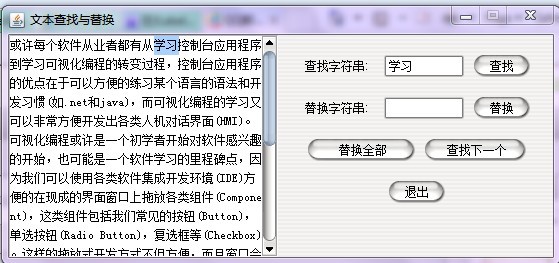
前两天,深大的一个同学突然想我帮她写一个java的作业。本来就是很菜的我在当时还是顶着做不出来的风险接下来了,经过两天的奋战,大功告成。逃课了,熬夜了,不吃饭了,但是学到了很多。下面贴一下代码:
1
 /**//**
2 * @(#)Mainframe.java
3 *
4 * Mainframe application
5 *
6 * @author 陈秋媚
7 * @version 1.00 2009/5/14
8 */
*/
9
10
11import java.awt.*;
12import java.awt.Container;
13import javax.swing.UIManager;
14import javax.swing.*;
15import java.awt.event.*;
16import javax.swing.text.*;
17import java.util.regex.*;
18import javax.swing.UnsupportedLookAndFeelException;
19public class Mainframe extends JFrame { //declare a object Mainframe extends from JFrame
20
21
22
23
24 JTextArea jTextArea1 = new JTextArea();//a jtextarea that used to hold the main text
25 JPanel jPanel1 = new JPanel(); //create a jpanel object to hold the following buttons and jTextFields
26 JLabel jLabel1 = new JLabel("查找字符串: ");// indicate the jtextfield
27 JLabel jLabel2 = new JLabel("替换字符串: "); //the same as above
28 JLabel jLabel3 = new JLabel("文本区域: ");
29 JTextField jTextField1 = new JTextField(); //a jtextfield that contain the string to be indexed
30 JTextField jTextField2 = new JTextField();// contain the string used to replace the string found
31 JButton jButton1 = new JButton("查找"); // a button clicked to find the string
32 JButton jButton2 = new JButton("替换"); // a button clicked to replace the string
33 JButton jButton3 = new JButton(" 替换全部 "); // replaceall
34 JButton jButton4 = new JButton(" 查找下一个 "); //find the next matches string
35 JButton jButton5 = new JButton("退出"); //click to exit
36 JScrollPane sp=new JScrollPane(jTextArea1); // this is used to roll the scroll when necessary
37 int start; // indicating the starting position of highlight text
38 int end; // indicating the ending position of highlight text
39 public Mainframe()
40
 {
{
41 JFrame frame = new JFrame(); // main frame
42 frame.setResizable(false); // disable the mainframe's resizability
43 frame.setLayout(new GridLayout(1,2,5,1)); // design the mainframe into two parts ,one part contain the jtextarea
44 // other part to hold the jpanel
45
46 jTextArea1.setText //setText
47 ("花谢花飞花满天,红消香断有谁怜"+
48 "游丝软系飘春榭,落絮轻沾扑绣帘。"+
49 "闺中女儿惜春暮,愁绪满怀无处诉。"+
50 "手把花锄出绣帘,忍踏落花来复去。"+
51 "三月香巢已垒成,梁间燕子太无情!"+
52 "明年花发虽可啄,却不道人去梁空巢也倾。"+
53 "一年三百六十日,风刀霜剑严相逼。"+
54 "明媚鲜妍能几时?一朝飘泊难寻觅。"+
55 "花开易见落难寻,阶前闷杀葬花人。"+
56 "独倚花锄泪暗洒,洒上空枝见血痕。"+
57 "杜鹃无语正黄昏,荷锄归去掩重门。"+
58 "青灯照壁人初睡,冷雨敲门被未温。"+
59 "怪奴底事倍伤神,半为怜春半恼春。"+
60 "怜春忽至恼忽去,至又无言去不闻。"+
61 "昨宵庭外悲歌发,知是花魂与鸟魂?"+
62 "花魂鸟魂总难留,鸟自无言花自羞。"+
63 "愿奴胁下生双翼,随花飞到天尽头。"+
64 "天尽头,何处有香丘?"+
65 "未若锦囊收艳骨,一抔净土掩风流。"+
66 "质本洁来还洁去,强于污淖陷渠沟。"+
67 "尔今死去侬收葬,未卜侬身何日丧?"+
68 "侬今葬花人笑痴,他年葬侬知是谁?"+
69 "试看春残花渐落,便是红颜老死时。"+
70 "一朝春尽红颜老,花落人亡两不知!"+
71 "(选自《红楼梦》第二十七回:滴翠亭杨妃戏彩蝶 埋香冢飞燕泣残红 )");
72 jTextArea1.setLineWrap( true ); //toggle wordwrap
73 jTextArea1.setBackground(Color.WHITE); // setBackground
74 jPanel1.setLayout(new GridLayout(4,4)); // divid the jpanel into four parts
75 jTextField1.setMinimumSize(new Dimension(6, 22)); //setMinimumSize
76 jTextField1.setOpaque(true); // not transparent
77 jTextField1.setPreferredSize(new Dimension(80, 22)); //set Preferred Size
78 jTextField2.setMinimumSize(new Dimension(6, 22));
79 jTextField2.setOpaque(true);
80 jTextField2.setPreferredSize(new Dimension(80, 22));
81 jButton1.addActionListener(new Button1Action(this)); // listen to see whether there is a button down ,if so act as the
82 // class Button1Action discribes.
83 jButton2.addActionListener(new Button2Action(this)); // similar
84 /**//*
85 *
86 * the following code is used to design the position of each element in the main frame
87 * using layout manager
88 **/
**/
89 jButton3.addActionListener(new Button3Action(this));
90 jButton4.addActionListener(new Button4Action(this));
91 jButton5.addActionListener(new Button5Action(this));
92
93 jPanel1.add(jLabel1,null);
94 jPanel1.setLayout(new FlowLayout(FlowLayout.CENTER,10,20));
95 jPanel1.add(jTextField1,null);
96 jPanel1.add(jButton1,null);
97 jPanel1.add(jLabel2,null);
98 jPanel1.add(jTextField2, null);
99 jPanel1.add(jButton2, null);
100 jPanel1.add(jButton3, null);
101 jPanel1.add(jButton4);
102 jPanel1.add(jButton5,BorderLayout.SOUTH);
103
104 frame.add(sp,BorderLayout.WEST);
105 frame.add(jPanel1,BorderLayout.EAST);
106
107 frame.setSize(550,250);
108 frame.setLocationRelativeTo(null);
109 frame.setTitle("文本查找与替换");
110 frame.setVisible(true); // main frame is able to display when create
111 frame.setDefaultCloseOperation(JFrame.EXIT_ON_CLOSE);
112 }
113 private class Button1Action implements ActionListener // class that encapsulate the methon when jbutton1
114 //is clicked down
115 {
116 Mainframe adaptee;
117 Button1Action(Mainframe adaptee)
118 {
119 this.adaptee = adaptee;
120 }
121
122 public void actionPerformed(ActionEvent e)
123 {
124 String searchString = jTextField1.getText(); //get the string (the string want to find)in the jtextfield1 to searchstring
125 String areaString = jTextArea1.getText(); //get the string( used to replace the string above) in the jtextfield2 to searchstring
126 start = areaString.indexOf(searchString); // find the starting position of the first matches string
127 if(start==-1) // don't find the string
128 {
129 JFrame frame = new JFrame(); // create a frame window to tell the user that the string is not found
130 JLabel error =new JLabel(" 没有找到你所要的文本!");
131 frame.add(error);
132 frame.setSize(200,150); //setsize
133 frame.setLocationRelativeTo(null); // its default loacation is in the middle
134 frame.setTitle("出错"); //set its title
135 frame.setVisible(true); // able to see
136
137 }
138 else // found the wanted string
139 {
140 end = start + searchString.length(); // set the end of the position of the wanted string in the jtextarea
141 jTextArea1.getHighlighter().removeAllHighlights(); // remove the highlight aready in the jtextarea
142 try
143 {
144 jTextArea1.getHighlighter().addHighlight(start, end,DefaultHighlighter.DefaultPainter); //highlight the wanted string
145 }
146 catch (BadLocationException ex) // catch exception
147 {
148 }
149 int row=jTextArea1.getWidth(); // get the width of the jtextarea
150 Point p=new Point(0,(int)((start*13)/row)*13); //calculate the distance needed to roll so as to see the
151 //wanted string
152 sp.getViewport().setViewPosition(p); //roll the scroll
153 }
154 }
155 }
156
157 private class Button2Action implements ActionListener // class that encapsulate the methon when jbutton2
158 //is clicked down
159 {
160 Mainframe adaptee;
161 Button2Action(Mainframe adaptee)
162 {
163 this.adaptee = adaptee;
164 }
165
166 public void actionPerformed(ActionEvent e)
167 {
168 String replaceString = jTextField2.getText(); //get the string which is used replace the found string in jtextfield which
169
170 if(start==-1) // don't find the wanted string
171 {
172 JFrame frame = new JFrame(); // tell the user we don't find it
173 JLabel error =new JLabel(" 你并没有选定任何文本!");
174 frame.add(error);
175 frame.setSize(200,150);
176 frame.setLocationRelativeTo(null);
177 frame.setTitle("出错");
178 frame.setVisible(true);
179
180 }
181 else
182 {
183 int row=jTextArea1.getWidth(); //calculate the distance needed to roll so as to see the
184 //wanted string
185 Point p=new Point(0,(int)((start*13)/row)*13);
186 sp.getViewport().setViewPosition(p); // set view position
187 jTextArea1.replaceRange(replaceString,start,end); //use replaceString the replace the contend in the
188 // jtextarea from position start to the position end
189 end=start+replaceString.length(); //reset the position of the replacestring so as to highlight it
190 jTextArea1.getHighlighter().removeAllHighlights();
191 try
192 {
193 jTextArea1.getHighlighter().addHighlight(start, end,DefaultHighlighter.DefaultPainter);
194 }
195 catch (BadLocationException ex)
196 {
197 }
198 }
199 }
200 }
201 private class Button3Action implements ActionListener // class that encapsulate the methon when jbutton3
202 //is clicked down
203 {
204 Mainframe adaptee;
205 Button3Action(Mainframe adaptee)
206 {
207 this.adaptee = adaptee;
208 }
209
210 public void actionPerformed(ActionEvent e)
211 {
212
213 String searchString = jTextField1.getText();
214 String replaceString = jTextField2.getText();
215 String areaString = jTextArea1.getText();
216 Pattern p = Pattern.compile(searchString); //正则表达式去匹配所有匹配的字符串
217 Matcher matcher = p.matcher(areaString);
218 if(matcher.find())
219 {
220 areaString=areaString.replaceAll(searchString,replaceString); //replace all the matched string
221 jTextArea1.setText(areaString); // reset the textarea
222 }
223 else // if don't find the matched string ,create a frame windows the tell the user
224 {
225 JFrame frame = new JFrame();
226 JLabel error =new JLabel(" 根本没有你要的字符串!");
227 frame.add(error);
228 frame.setSize(250,100);
229 frame.setLocationRelativeTo(null);
230 frame.setTitle("出错");
231 frame.setVisible(true);
232 }
233
234 }
235 }
236 private class Button4Action implements ActionListener // class that encapsulate the methon when jbutton4
237 //is clicked down
238 {
239 Mainframe adaptee;
240 Button4Action(Mainframe adaptee)
241 {
242 this.adaptee = adaptee;
243 }
244
245 public void actionPerformed(ActionEvent e)
246 {
247 String searchString = jTextField1.getText();
248 String areaString = jTextArea1.getText();
249 int index=start+1;
250 //while(true)
251 {
252 index=areaString.indexOf(searchString,index);// once clickdown ,find the next matched string
253 if(index==-1) // if all the text is searched
254 {
255 JFrame frame = new JFrame();
256 JLabel error =new JLabel(" 已经找完了!"); // aready search all the textarea
257 frame.add(error);
258 frame.setSize(100,100);
259 frame.setLocationRelativeTo(null);
260 frame.setTitle("温馨提示");
261 frame.setVisible(true);
262 }
263 else // else set the positions to next matched string and high light it
264 {
265 start=index;
266 end=start+searchString.length();
267 jTextArea1.getHighlighter().removeAllHighlights();
268 try
269 {
270 jTextArea1.getHighlighter().addHighlight(start,end,DefaultHighlighter.DefaultPainter);
271
272 }
273 catch (BadLocationException ex)
274 {
275 }
276 int row=jTextArea1.getWidth(); //calculate the precise distance to roll the scroll
277 // so the next found string right in the center of the
278 // jtextarea
279 Point p=new Point(0,(int)(((start*13)/row)-5)*13);
280 sp.getViewport().setViewPosition(p);
281
282 }
283
284 }
285 }
286
287 }
288 private class Button5Action implements ActionListener // class that encapsulate the methon when jbutton4
289 //is clicked down
290 {
291 Mainframe adaptee;
292 Button5Action(Mainframe adaptee)
293 {
294 this.adaptee = adaptee;
295 }
296
297 public void actionPerformed(ActionEvent e) // when the user click the exit button ,quit the program
298 {
299 System.exit(0);
300 }
301 }
302 public static void main(String[] args) {
303
304 new Mainframe();
305 //System.out.println("Hello World!");
306 }
307
308}
309
310
311
312
313
贴个图吧,呵呵,当时做出来时候好激动啊。学了这么久C++,从来都是在控制台写那些黑白程序,现在终于可以看到一个有界面的了。感动,‘
不过后来我也尝试用netbeans去写,结果发现好简单,netbeans几乎都是控件拖拽设计出来界面,然后直接点进去写代码,很简单,代码的框架netbeans已经为你写好了,感觉有点像做填空题一样。